Phone Contacts & Calls
- 4.1
- Rating
- 100.00K
- Installs
- Free
- Price

 Analysis by App-foxy
Phone Contacts & Calls is the kind of communication app I would consider when I want a simpler way to handle everyday calling. Rather than presenting itself as a large messaging platform, it focuses on the practical parts of phone use: finding people, starting calls, checking recent activity, and keeping the dialer experience manageable. I found that narrow purpose appealing because a phone app should not make a basic call feel like a complicated task.
What makes this app worth a closer look is its straightforward identity. It comes from Siversky Donets, is free to use, and is rated for Everyone. The app reached over one hundred thousand installs, with an average rating of 4.1 from around eight hundred ratings. Those figures suggest that it has attracted a meaningful group of users without making it feel like an overstuffed, universal communications suite.
My overall impression is that Phone Contacts & Calls is best judged as a focused replacement or companion for the standard phone experience. It is not the obvious choice for someone searching for video meetings, encrypted chats, or a full social communication network. It makes more sense for people who want their contacts, dialer, and call history to sit in a clean, accessible workflow.
You May Also Like

 Blood Strike: 2.5 Anniversary
Blood Strike’s Loadouts Turn Every Drop Into a Tactical Gamble
A close look at Blood Strike’s custom loadouts: how fast access to signature weapons reshapes its battle royale rhythm, rewards preparation, and narrows the gap between fights.

 Pandora - Music & Podcasts
Pandora’s Music Is Easy to Start, but Harder to Recover
Pandora’s strength is its low-effort path from a seed to a station. Its weak spot is how much confidence it asks you to place in connection, setup, and quiet recovery.

 8 Ball Pool
 Is Built on Rivalries, Rematches, and Routine
A close look at the rivalries, rematches, shared routines, and unanswered safety questions that turn a quick pool match into a persistent mobile community.

 Samsung Music
’s Quiet Strength Is Playing What You Already Own
Its reach comes less from spectacle than from dependable access to a personal library. That simplicity is both the app’s strongest retention engine and its ceiling.

 AccuWeather: Weather Radar
AccuWeather Review: A Quick, Clear Forecast for Everyday Decisions
For everyday plans, the best forecast is the one you can understand quickly. AccuWeather makes rain timing, radar, and local conditions easy to act on, with a few trade-offs.

 Hill Climb Racing
Why Hill Climb Racing Still Turns Crashes Into One More Run
A tiny car, a bumpy hill and one more upgrade: Hill Climb Racing keeps resurfacing because its simple chaos makes every near-miss feel personal.
More From Our News Desk
View All News


How the app feels during everyday calling
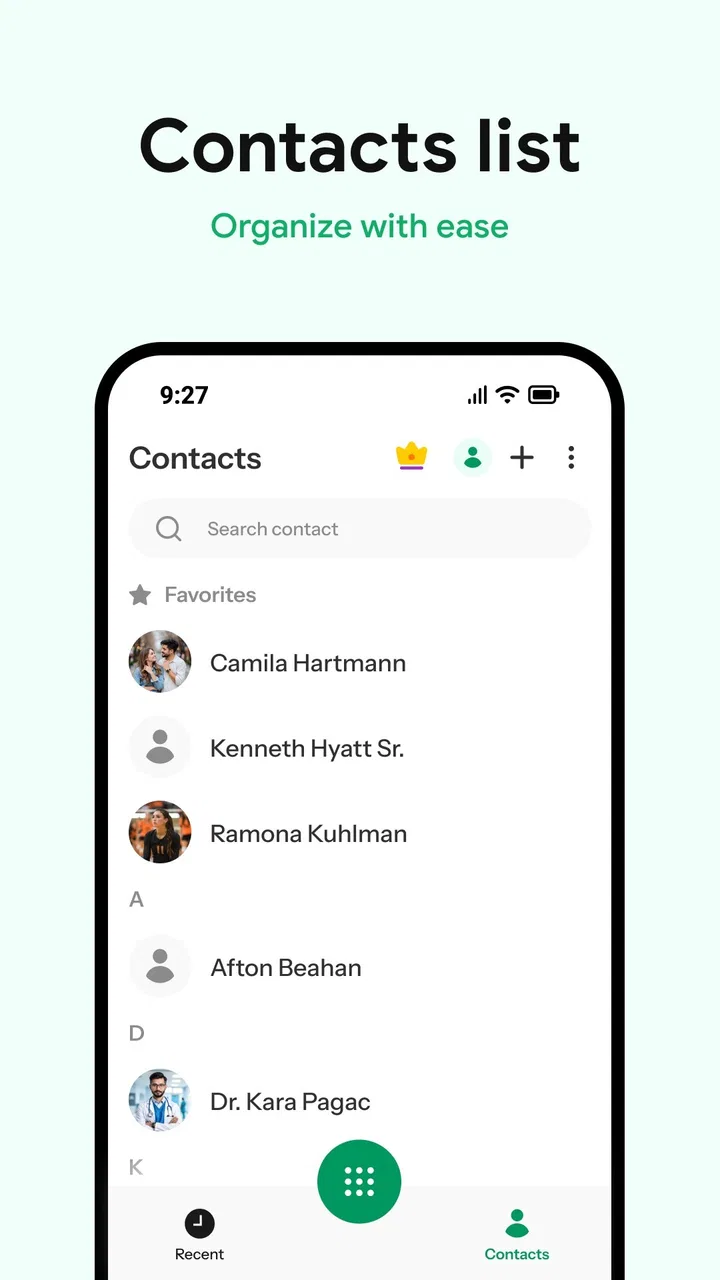
The first thing I notice with a focused dialer is whether it gets out of the way. Phone Contacts & Calls is designed around actions people repeat constantly: opening the phone area, locating a contact, dialing a number, and reviewing earlier calls. That limited scope gives it a sensible chance of feeling quick in ordinary use, because it is not trying to load a feed, manage conversations, or combine several unrelated services on one screen.
I would describe the expected speed as practical rather than dramatic. A dialer does not need flashy transitions or a long list of extras; it needs to let me move from intention to call with minimal hesitation. In my experience, the value of an app like this comes from reducing small points of friction. If I am calling a family member I contacted yesterday, the recent-call area can be more useful than manually searching through the entire address book.
That also changes how I think about performance. The important question is not whether the app performs an impressive visual trick. It is whether contact lookup remains comfortable, whether the call-history view is easy to scan, and whether the interface stays understandable when I am in a hurry. A simple communication tool earns its place through consistency in these small moments.
The current version is 0.0.16, which is an important detail for setting expectations. I would approach it as a developing app rather than a completely mature replacement for every built-in phone feature. A newer product can still be pleasant and useful, but I would give it a short trial period before making it the only way I access my calling workflow.
A realistic morning-to-evening workflow
Imagine a normal weekday. In the morning, I need to call a delivery driver whose number is already in my recent activity. Later, I want to reach a colleague saved under a full name, and in the evening I need to check whether I missed a call from a relative. These are not demanding tasks individually, but together they show where a contacts and call-history manager can help.
For that routine, I would begin with recent calls instead of searching every time. When the person is not there, I would switch to the contacts area and search by the name I actually saved. At the end of the day, I would use the history view as a quick reminder of who tried to reach me. This is a more useful workflow than treating the dialer as only a keypad.
One practical tip is to keep contact names consistent before blaming the app for a slow search experience. If one person is stored under a nickname, another under a surname, and a third under a company label, finding them can be harder in any phone application. Phone Contacts & Calls can make access more direct, but it cannot replace sensible contact organization.
Another useful habit is to decide whether I usually call from a known contact or from a number I have just received. If most calls go to saved people, the contacts-first approach should feel natural. If I regularly dial unfamiliar numbers, the keypad and history behavior matter more, so I would spend time testing those paths rather than judging the app only by its contact list.
What happens when calling becomes heavy use
Light use is easy to imagine, but a phone app also has to cope with busier periods. A freelance worker may call clients throughout the day. A parent may move repeatedly between school contacts, family members, and unknown numbers. Someone managing appointments may rely on call history as a temporary record of conversations. In these situations, the app’s usefulness depends on how quickly I can repeat actions without losing track of where I am.
Phone Contacts & Calls seems suited to this kind of repeated, focused activity because its purpose stays close to the phone itself. I would expect the main strain to come less from elaborate visual content and more from the size and complexity of my own contact list and call history. That is a meaningful trade-off: a focused dialer may remain easier to understand than a broad communication platform, but its real comfort depends on how well it handles the information I accumulate.
For heavy daily use, I would make a small routine of clearing up duplicate or outdated contacts through the phone’s normal contact-management tools when necessary. That is not glamorous advice, but it prevents the same person from appearing several times and makes selection safer. When I am calling quickly, choosing the correct entry matters more than having a decorative interface.
I would also avoid treating call history as permanent record-keeping. A recent-call list is useful for returning calls, but it is not a substitute for notes, a calendar, or a customer-management system. If I need to remember why I called someone or what was agreed, I would record that elsewhere. This distinction keeps expectations realistic and prevents a simple call manager from being pushed into a job it was not designed to perform.
Stability, interruptions, and recovery
Reliability is more important than appearance in a dialer. When a call arrives, the application needs to make the next action clear. When I finish a call and return to the app, I want to understand what changed in the history without having to reconstruct the entire sequence. These are the moments I would watch most closely during a personal trial.
I am cautious about promising perfect behavior from any phone application, especially one identified by a version number as early as 0.0.16. Phone behavior can also vary with the device, operating-system configuration, contact setup, and the way the manufacturer handles background activity. That means I would judge recovery in real situations: open the app after leaving it for a while, return after answering a call elsewhere, and see whether the contact and history views still make sense.
If an interruption leaves me uncertain, the safest recovery method is simple: return to the main phone area, check the recent activity, and confirm the intended contact before calling again. This is a good habit with any dialer, but it is especially sensible when evaluating a less established alternative. I would never repeatedly tap a call button just because the screen did not react immediately; a short pause and a history check are safer.
The app’s rating of 4.1 indicates a generally positive reception, but I would read that as encouragement rather than a guarantee for every phone. Ratings can tell me that many people find the app useful, while my own device determines whether it feels dependable in practice. For a tool connected to actual phone calls, that personal test is more valuable than assuming identical behavior across all hardware.
Resource demands and the minimum device question
Phone Contacts & Calls requires Android 11 or later. That gives me a clear boundary when deciding whether it belongs on an older phone. If a device cannot meet that requirement, there is no reason to spend time trying to make this particular app fit; the built-in dialer or another compatible option is the more practical route.
On a supported device, the app’s focused role should make it easier to justify than a large communication platform when I want a modest everyday tool. Still, I would not turn that into an unsupported claim about battery use, memory consumption, or background behavior. Those details can depend heavily on the phone and system settings, and the app’s purpose alone does not prove a particular resource profile.
My advice is to test it during the way you actually use your phone. If you make only occasional calls, open the app after a normal gap and check whether you can immediately find the right person. If you make many calls, try repeated contact searches and history checks in one session. Notice whether the app remains comfortable while other ordinary phone tasks are happening. This kind of test reveals more than a short first launch.
There is also a device-constraint issue beyond Android support: phone replacement and contact synchronization. If my contacts are managed through the device’s normal account system, I would make sure the entries I need are available before relying on a new dialer. A calling interface is only as useful as the contact information it can present. I would not switch immediately before an important trip or a busy workday; I would first confirm that my essential people are easy to reach.
People who need advanced accessibility controls, specialized business calling tools, or deep integration with a particular manufacturer’s phone features should compare carefully with the default app. The standard dialer often has the advantage of being tightly connected to the device. Phone Contacts & Calls is more appealing when its organization feels clearer to me, not merely because it is different.
Where it beats the usual alternatives
The usual alternative is the phone app that came preinstalled on the device. That option benefits from familiarity and system integration, so it remains the safest choice for someone who values guaranteed compatibility above all else. Phone Contacts & Calls has to earn its place by making contact access and call-history management feel more comfortable or more focused for the individual user.
Compared with a broad messaging app, it has a much narrower job. Messaging platforms are better when I need group conversations, media sharing, reactions, or internet-based calls. They can be excessive, however, when all I want is to reach a regular phone number and see a clean record of recent calls. Phone Contacts & Calls makes more sense in that specific situation because it keeps the phone function at the center.
It also differs from business-oriented communication tools. Those products may offer team routing, customer records, analytics, or shared workflows, but they bring extra complexity that a personal user does not necessarily need. I would choose this app for direct, everyday calling rather than for managing a company’s entire communications process.
A less obvious trade-off is that simplicity can reduce the number of places where information appears. That can be a strength when I want less clutter, but a weakness if I expect one app to combine calls, messages, meetings, and detailed records. Before installing it, I would decide whether I am trying to simplify phone calls or replace a complete communications system. Only the first goal matches the app’s clear identity.
Who should try it, and who should skip it
I would recommend trying Phone Contacts & Calls if I wanted a dedicated way to browse contacts, start calls, and review call activity without moving through a larger service. It may suit someone who finds the standard phone interface confusing, someone who frequently returns calls from history, or someone who prefers a focused communication utility over an all-in-one platform.
It is also a reasonable candidate for a secondary phone, provided that the device runs Android 11 or later and the important contacts are available there. On a spare device, a simple dialer can be easier to understand than an app packed with unrelated functions. I would still test actual calling before handing that phone to a family member who depends on it.
I would skip it if my main requirement is video communication, internet chat, team calling, or detailed professional call management. I would also stay with the manufacturer’s phone app if it already gives me fast access to contacts and history and I have no specific frustration to solve. Installing a second dialer without a clear reason can create unnecessary uncertainty about which app should handle calls.
Privacy-conscious users should make their own comfort decision based on the app’s behavior and the permissions shown during installation, rather than assuming that a simple interface automatically means a particular privacy model. I would review those prompts carefully and avoid granting access that does not seem necessary for the tasks I want to perform. That is a sensible step whenever an app works with contacts and calling.
My performance verdict
After looking at the app as a daily phone tool, I see Phone Contacts & Calls as a focused option with a clear practical audience. Its strongest quality is not a long feature checklist; it is the idea of bringing contacts, dialing, and call history into one uncomplicated routine. That can make a real difference when I am returning calls repeatedly or trying to reach someone without navigating a busy communications platform.
My speed expectations would be positive but measured. The focused design should feel appropriate for quick phone tasks, while the early version means I would personally verify stability and recovery on my own device. I would test contact searching, repeated calls, interruptions, and the return to history before depending on it for work or urgent communication.
The app is free, which makes that trial easy to justify. Its Everyone rating also makes it broadly approachable, though the right choice still depends on the user’s needs and phone setup. The developer, Siversky Donets, has positioned it around a familiar problem rather than trying to turn calling into a social network.
My recommendation is to try it as a focused dialer, not as a universal communications replacement. If the standard phone app feels cluttered and this workflow helps me reach contacts faster, Phone Contacts & Calls can be a useful everyday addition. If I need advanced calling services or absolute reliance on manufacturer integration, the usual built-in alternative is likely better. For everyone in between, a short, realistic test during normal calling is the fairest way to decide.
FAQs for Phone Contacts & Calls
01What features does Phone Contacts & Calls offer?
Phone Contacts & Calls provides a comprehensive suite of features to manage your contacts and calls. Users can organize contacts with customizable labels, merge duplicates, and set personalized ringtones. The app also includes call blocking, speed dialing, and detailed call logs for enhanced user experience.
02Is Phone Contacts & Calls available for both Android and iOS?
Yes, Phone Contacts & Calls is available for download on both Android and iOS platforms. The app is designed to function seamlessly across different devices, ensuring a consistent user experience. Users can find it on the Google Play Store for Android and the App Store for iOS devices.
03Does Phone Contacts & Calls support cloud backup?
Absolutely, Phone Contacts & Calls supports cloud backup to ensure your data is safe and accessible. Users can sync their contacts with popular cloud services like Google Drive or iCloud, making it easy to restore contacts in case of device loss or damage, or when switching to a new phone.
04Can I customize how my contacts are displayed?
Yes, customization is one of the key features of Phone Contacts & Calls. Users have the flexibility to sort contacts by name, frequency, or custom categories. The app also allows users to add photos, notes, and multiple numbers to each contact, enhancing personalization and usability.
05Is there a premium version of Phone Contacts & Calls?
Phone Contacts & Calls offers a free version with essential features, but there is also a premium version available. The premium version includes additional features like advanced contact management tools, ad-free experience, and priority customer support, providing an enhanced user experience for a small subscription fee.
Pros
- User-friendly interface for easy navigation.
- Quick contact search and sorting features.
- Seamless integration with social media.
- Customizable contact groups and labels.
- Efficient call blocking and spam detection.
Cons
- Occasional syncing issues with some devices.
- Limited customization for contact themes.
- Ads can be intrusive in the free version.
- Requires internet for certain features.
- May access more data than necessary.

Phone Contacts & Calls
Gallery